![Eleiko_Logo_2021.png]](https://knowledgebase.eleiko.com/hs-fs/hubfs/Eleiko_Logo_2021.png?height=40&name=Eleiko_Logo_2021.png)
Pre created views that are good to use
Contact views:
- All contacts - Eleiko version
- All My contacts - Eleiko version
- All My contacts with Deals - Eleiko version
- My Company contacts - Eleiko version
- My Private contacts - Eleiko version
Company views:
- My Companies - Eleiko version
- My Companies with Deals - Eleiko version
- My Companies with Open Deals - Eleiko version *(not Closed Lost and Closed won)
- All Companies - Eleiko version
Deal views:
- My Deals - Eleiko version
- Expiry date within 14 days
- All Deals - Eleiko version
Add a pre created view
Contacts > Add view > Search for the view > Click on correct view under Created by others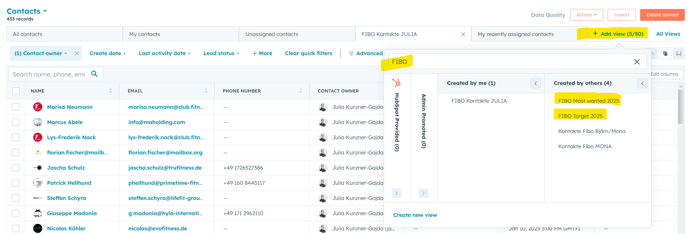
Create your own view
Clone a view that is a good start.
Update it my using Advanced filters.
Update columns and column order in column view under Edit columns
SAVE