![Eleiko_Logo_2021.png]](https://knowledgebase.eleiko.com/hs-fs/hubfs/Eleiko_Logo_2021.png?height=40&name=Eleiko_Logo_2021.png)
A new feature in Enterprise has been launched today. As you might know, set articles are a big headache for Eleiko. To solve this, we developed a new feature, called “Bundle”. From now on you can create your own set articles directly in your quote. This is possible with all products from our portfolio. Ex: Show a RIG as one product instead of 10 different articles on your Quote PDF.
Our next step is to update all existing standard set articles (ex: Racks, Benches, etc.) we have today to this bundle setup. Goal to implement this is before the year ends.
NOTE: You cannot add todays set articles to a bundle because these are two different setups. This will be working when we updated them to the new logic as described above.
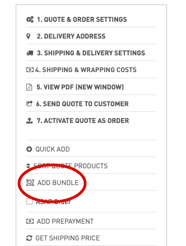
2. By clicking, it asks for a name for your custom bundle.
3. Now you are in the edit bundle mode. Simply checkbox and connect on the products you want to add to your bundle and click SAVE.
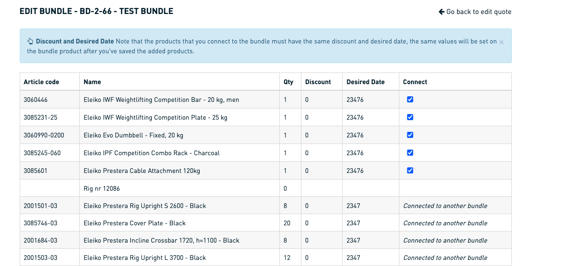
NOTE: If you want to edit the bundle later just click this new icon to go into the edit mode again. The new variant functionality we added some weeks ago works also with the new bundle function.

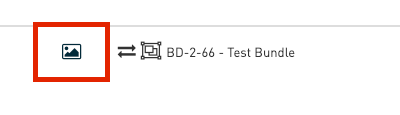
4. You are also able to add a picture to your created bundle product by clicking this icon.
NOTE: If you want to have the RIG as single components you can go into the edit bundle mode and simply disconnect the articles.

6. This new bundle view only applies to your quote PDF. The order confirmation and invoice will always be with the single articles. On the order confirmation we made it visible which products belong to which bundle.
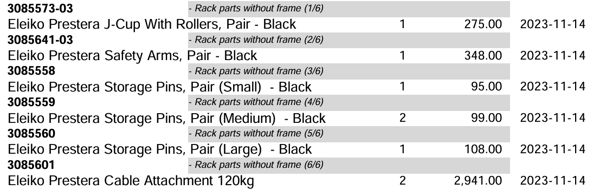
NOTE: It was also part of the project that especially on the invoice, we invoice all single parts and no set articles anymore.
If you have any questions don’t hesitate to contact Daniel Mattern or Hans Blomberg.