![Eleiko_Logo_2021.png]](https://knowledgebase.eleiko.com/hs-fs/hubfs/Eleiko_Logo_2021.png?height=40&name=Eleiko_Logo_2021.png)
Importing contacts
Create a Form
Importing contacts
The contacts/companies needs to be in the template format to be imported. Not all columns needs information but please read this article first and make sure that you have as much information as possible in the document before you send it to Kajsa or import it.
Excel template to download
Please do not hesitate to ask Kajsa when you are about to do an import since there are many things to think about.
- Should the contacts be included in the newsletter? (Use "FORM Sign up for newsletter")
- Should the contacts first receive the global welcome newsletters?
Global welcome newsletter: https://app.hubspot.com/workflows/8842163/platform/flow/196037748/edit
2 emails that goes out before they are connected to the "normal" newsletters. This is so far only for contacts that has Preferred language set as English.
- Do I know the Preferred language of the contacts?
- Do I know the country? (Use "Country")
- Do I know "Equipment for"? Choose "Private/Home" or "Commercial"
- Do I know "Segmentation"*? *see list below
- What is the Lead source? **see list below
- Eleiko Contact owner: Set the Sales rep who should follow up on this contact
- Is this a list of something else that is important to be saved in HubSpot on the customer card in case the list later is deleted?
Do I want to import companies? Note that you then need the domain name as a identifier or else you will get duplicates. (Ask Kajsa if unsure.)
NOTE! All contacts are used by all departments/teams so please never update any existing information before you are 100% sure this is okay. (Ask Kajsa if unsure.)
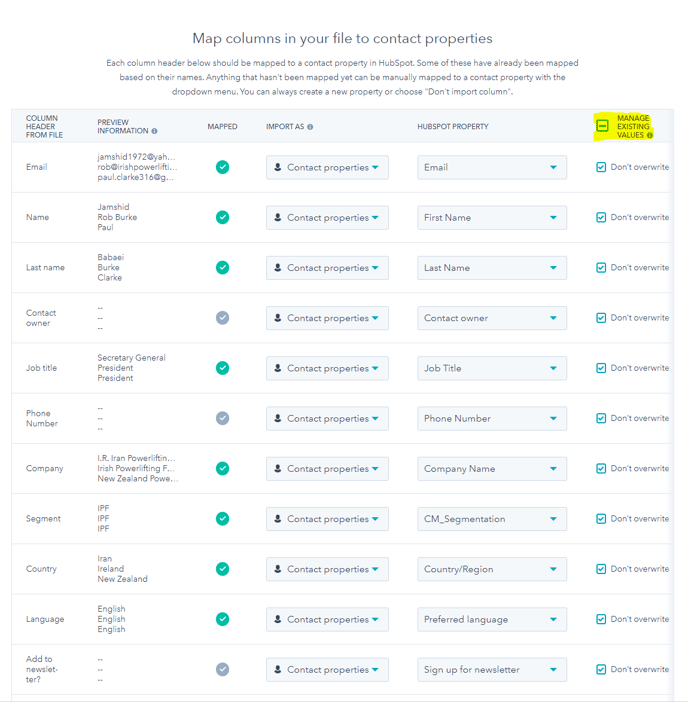
SEGMENTATION
*For this field you have to select from the below list
-
IWF Weightlifting
-
IPF Powerlifting
-
WPPO Powerlifting
-
Professional Sports
-
Military & First Responders
-
Schools & Universities
-
Medical/Rehab
-
Commercial Gym
-
Functional Fitness
-
Municipality/Public
-
Hotels/Spa/recreational
-
Corperate Gym
-
Subsidaries
-
Distributor/Retailer
-
Private Person/Home gym
LEAD SOURCE
**For this field you have to select from the below list
- Expo/Trade show/Event
- Returning Client/Existing Customers
- Referral
- Instagram/Facebook/Social Media
- Showroom/Walk-in
- Newsletter
- Ad/Marketing
- Via Website
- Education Course
- Webinar
- Competition
- Web shop
-
Inbound Call
-
Outbound - Cold Call
-
Outbound - Cold Mail
-
Outbound - Cold Site Visit
CONTACTS:
CM_Segmentation:
- IWF (IWF Weightlifting)
- IPF (IPF Powerlifting)
- WPO (WPPO Powerlifting)
- PS (Professional Sports)
- MFR (Military & First Responders)
- SU (Schools & Universities)
- MR (Medical/Rehab)
- CG (Commercial Gym)
- FF (Functional Fitness)
- MP (Municipality/Public)
- HSR (Hotels/Spa/recreational)
- COR (Corperate Gym)
- SS (Subsidaries)
- DR (Distributor/Retailer)
- PP (Private Person/Home gym)
AFTER AN IMPORT
Important to make sure they are correctly added or not added to the lists for the newsletter
- Preferred language
- Country (IMPORTANT: The one under Enterprise properties)
- Equipment for
- Sign up for newsletter
- Lead source
- CM_segmentation
- CM_receivenewsletter
- If English or unknown preferred language: Welcome newsletter workflow (Does it need to be set to No?)
- If not regular newsletter: Communication subscription type Marketing Email - Newsletter