![Eleiko_Logo_2021.png]](https://knowledgebase.eleiko.com/hs-fs/hubfs/Eleiko_Logo_2021.png?height=40&name=Eleiko_Logo_2021.png)
Web quote requests are automatically created as HubSpot deals that are already associated with the respective Contact and Company. Each deal comes with a linked Enterprise quote that includes all products the customer has shown interest in.
The Sales representative's responsibility is to review the quote and verify that all pricing is accurate. If needed reach out to the customer beforehand to confirm if they require any additional information or assistance in ensuring the quote meets their needs. Once the review is complete, the Sales rep sends the quote to the customer along with a personalized message from Enterprise.
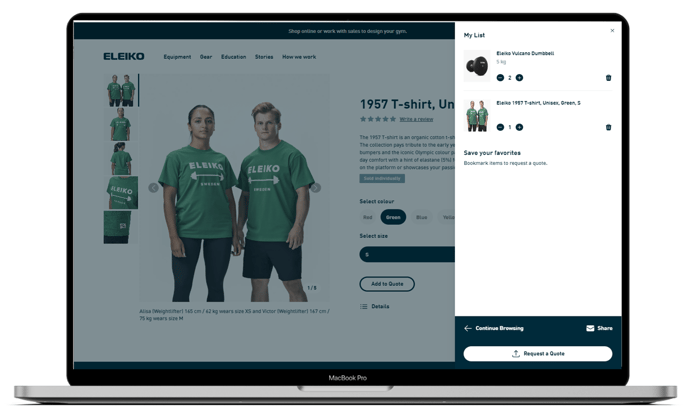
Website visitors can easily add products to "My List" by clicking the "Add to Quote" button located on product pages or within the 3D configurator on eleiko.com. Once products are added, customers can proceed by clicking the "Request a Quote" button. This action directs them to a form where they can fill out their details and choose either a specific Strength Expert from the drop-down menu, showing the Sales reps for different countries as listed on the Contact Sales page (https://eleiko.com/contact-sales) or select the option "Connect me to the best match" (see table below).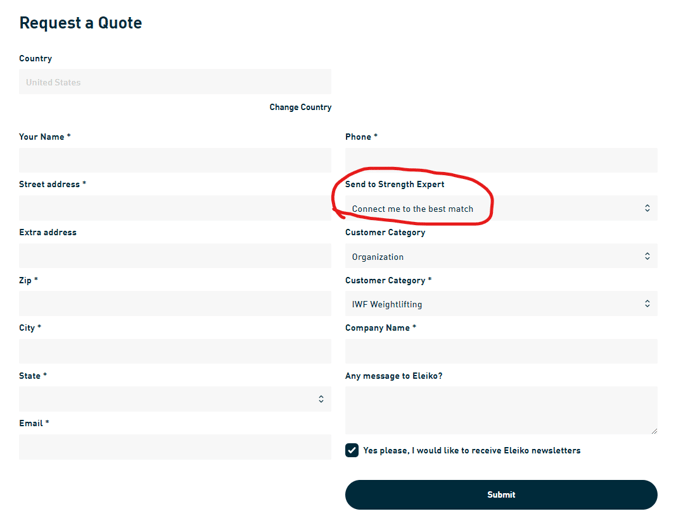
| Country | Receives the original quote request if "Connect me to the best match" is selected ** |
| Andorra | Ivan Ferrando |
| Belgium | Lotte Heemstra* |
| Canada | Based on segmentation & amount of quote |
| DACH | Based on zip code and country |
| Denmark | Allan Pedersen |
| Faroe Islands | Allan Pedersen |
| Finland | Jyrki Laakso |
| France | Florianne Caillon* |
| Gibraltar | Ivan Ferrando |
| Greenland | Allan Pedersen |
| Iceland | Joakim Nettelbladt |
| Ireland | Olivia Price* |
| Italy | Andrea Malorgio |
| Luxemburg | Lotte Heemstra* |
| Monaco | Florianne Caillon* |
| Netherlands | Lotte Heemstra* |
| Norway | André Holter* |
| Poland | Ralph Pfeifer |
| Portugal | Ivan Ferrando |
| Spain | Olivia Price* |
| Sweden | Based on ”landskap” |
| UK | Olivia Price* |
| USA | Based on state, segmentation & amount of quote |
| Åland | Joakim Nettelbladt |
| International/Export team | Based on country |
* The original owner should review the contact/company (delivery adress and segmentation) and the deal/quote to see what Sales rep is best fit to take the Web Quote. He/she will change the deal owner to the best match.
** If you have any questions or requested changes reach out to Kajsa Robertsson.
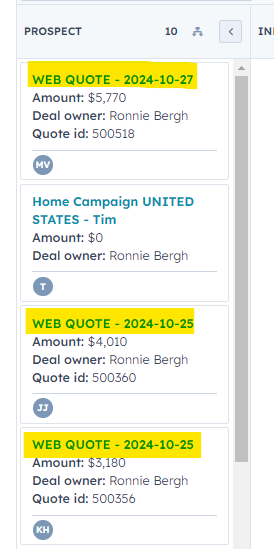
When the customer clicks "Submit" on the form, the system automatically generates a Deal in HubSpot. This Deal is already correctly linked to the respective Contact and Company, along with an Enterprise Quote that includes all the products selected from "My List." These deals is labeled as "WEB QUOTE - YY-MM-DD," making it easy to identify. If you as a sales representative have your HubSpot notifications enabled, you will receive an email when a new request is submitted. If notifications are not activated, it is recommended to check the deal pipeline each morning for any new web quote deals.
You can rename the Deal as you like but make sure to continue to use the automatically created deal through out the sales process so that we can continue to log it as a Quote request.
Any comments the customer has added to the Quote request form as well as any URLs from the 3D configurator build can be found in the Deal Description (se circled below).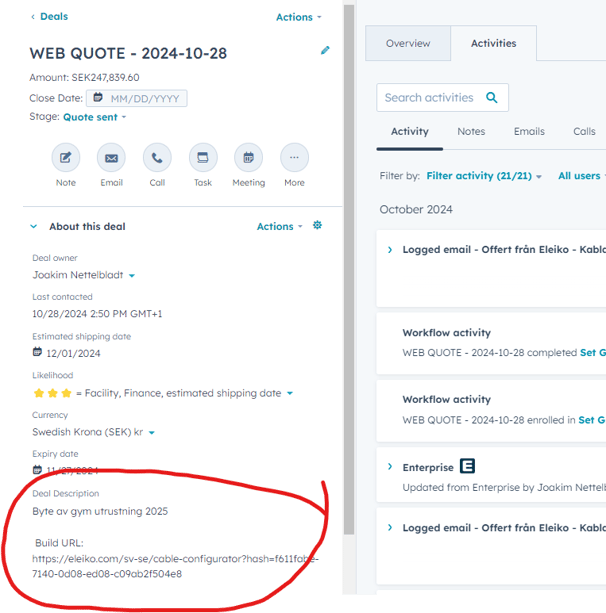
To access and review the actual quote with the products, click on the "Activate quote request" button (circled in red). This feature is only available to the owner of the Deal. If you are assisting a colleague you can easily add yourself as the Deal owner to gain access.
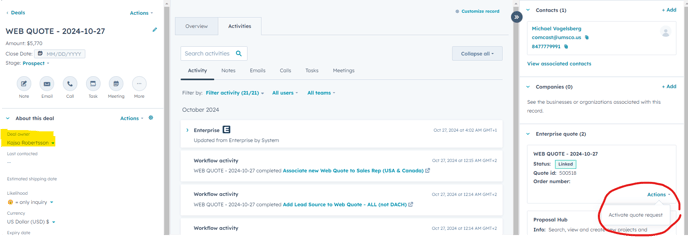
This action will open the Enterprise pop-up window, allowing you to select "Open quote" to view the details of the quote.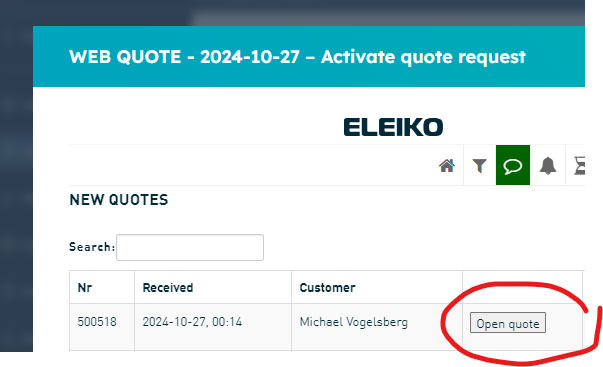
When you have opened/viewed the quote the deal will move to the Deal stage "Information gathering".
Review the quote to ensure that all pricing is accurate, and then send it to the customer along with a brief personalized message from Enterprise.
Any deals named "WEB QUOTE - YY-MM-DD" in Deal stage Prospect has not been opened/viewed.
Any deals in the Deal stage "Information gathering" has not been sent to the customer.
Make sure to take care off ALL of your Web quotes and contact the customer.
Move the Deal to the current correct Deal stage.