![Eleiko_Logo_2021.png]](https://knowledgebase.eleiko.com/hs-fs/hubfs/Eleiko_Logo_2021.png?height=40&name=Eleiko_Logo_2021.png)
In HubSpot on a Contact (or Company) you can log and/or Create meetings to keep track of any meeting activities done. For events such as FIBO and HFA this is mandatory for Sales reps.
First make sure to connect your Outlook Calendar to make sure meetings in HubSpot and Outlook are synced and the same. How to connect your Outlook calendar can be found in this article. If you have the meeting scheduler link any customers can book a meeting time and it will automatically be logged correctly in HubSpot. 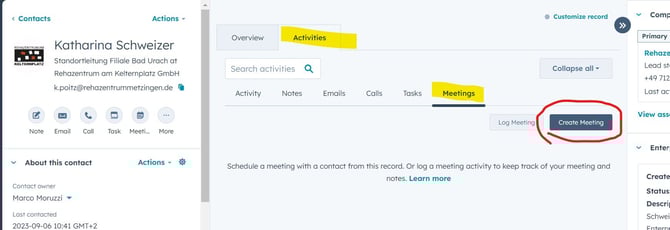
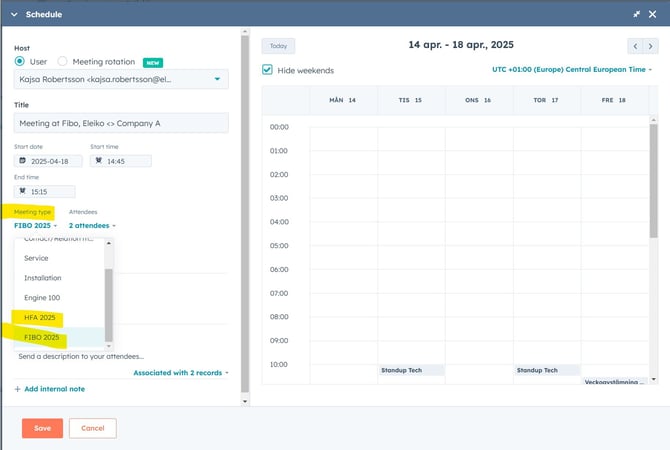
This will create a meeting in your Outlook and send a meeting invite to the customer.
Make sure to select Meeting type if FIBO or HFA
If you want to logg the meeting AFTER the meeting and not send an invite to customer you can simply Log the meeting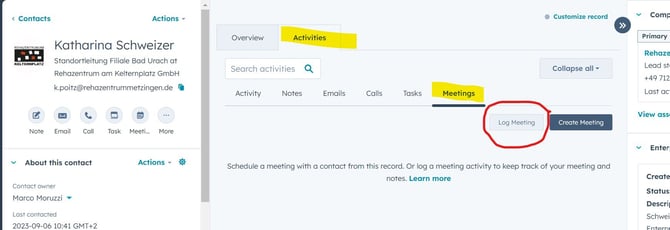
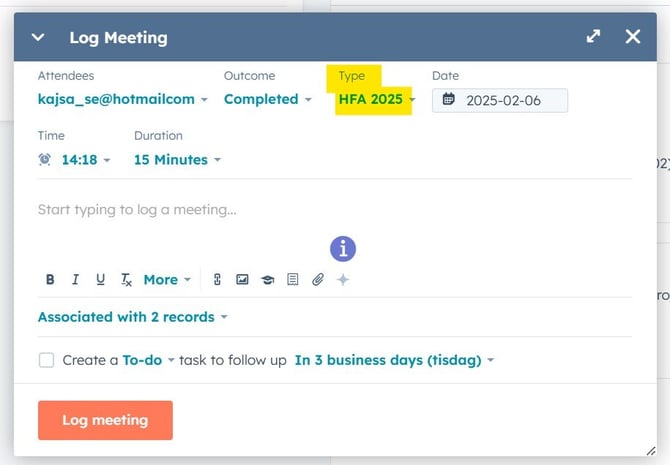
Make sure to select Meeting type if FIBO or HFA
After you have had your meeting, you need to log the outcome. You do this by clicking Actions -> Edit and change the value under Outcome.