![Eleiko_Logo_2021.png]](https://knowledgebase.eleiko.com/hs-fs/hubfs/Eleiko_Logo_2021.png?height=40&name=Eleiko_Logo_2021.png)
| First make sure you have read and followed the information in "Before you get started" articles |
Get started with HubSpot |
|
|
STEPS |
RELATED ARTICLES |
| 1. | CREATE CONTACT If you know the customer already exist in Enterprise you can go to step 4 before step 2 and go back to step 2 after. |
Contact and Companies |
| 2. | CREATE DEAL Create a Deal and work with the deal (lead). |
Deals pipeline and view |
| 3. |
INFORMATION GATHERING |
Send emails inside HubSpot Outlook add-in Log and track emails Use HubSpot task Use meeting links |
| Steps 1-3 can be done in the HubSpot mobile app if you find this more convienient when you are on the run. |
HubSpot in your mobile | |
| 4. | LINK CONTACT/COMPANY When you are in the pipeline stage "Ready for quote" it is time to link HubSpot contact/company to Enterprise customer. |
Link a HubSpot customer to Enterprise |
| 5. |
CREATE QUOTE |
Create and link an Enterprise quote for a deal |
| 6. | ACTIVATE ORDER When won "Open quote" from HubSpot deal and activate order in Enterprise pop-up window. If your user have the setting "Lock order creation unless quote is linked to HubSpot" you will not be able to activate the order in Enterprise unless it is linked to a deal in HubSpot. |
To follow up on your work you have the Deals view but also the Eleiko Sales Rep Dashboard. 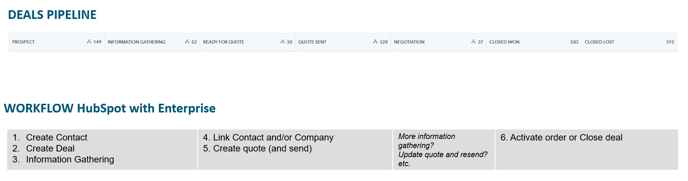 Fig, Deal pipeline stages vs Workflow steps
(right click > Open image in new tab to view it bigger)
QUESTIONS AND/OR SUGGESTIONS?
Contact Kajsa Robertsson in Teams or email kajsa.robertsson@eleiko.com
OLD WORKFLOW (more based FROM Enterprise)
- Open Enterprise and find the customer.
- Link/create customer from Enterprise to HubSpot.
- Go to the company in HubSpot and create a Deal
- When the deal is ready for quote Create Enterprise quote (this will automatically link the quote).
- When won Open quote from HubSpot deal and create order in Enterprise pop-up window